Best Invoice App for Tradesmen: 5 Options Compared for Australian Trade Businesses
We timed the same job through five invoicing apps Australian tradies use and compared pricing, Android support, accounting sync, trade fit and follow-up.

Paul Coleman · Co-founder, Korda Pro
We took one job and ran the relevant workflow through five invoicing options. Same customer details, same line items, same finish. For the timed test, we measured how long it took to send the invoice once the work was marked done.
Four of the timed workflows landed within a minute or two of each other. On this one-run test, that is more useful than it sounds, because it says something the feature lists do not: there was very little between the tools on the basic task of producing an invoice. Choosing between them is therefore more about workflow, pricing, accounting and field fit than a stopwatch difference.
So this guide looks at what you are actually choosing between. It covers what each option costs as a small crew grows, which ones work properly on Android, what the accounting sync really does, how follow-up works, and which trades each option fits. The full timing results are further down.
Who this guide is for
Australian trade business owners running one-person businesses or small crews, typically around one to three people. Plumbers, electricians, landscapers, HVAC technicians, roofers, pest control businesses and general contractors. You are already sending invoices in some form. You want the process to stop costing you evenings and stop delaying billing.
If you run large multi-stage construction projects with progress claims, retentions and variations to track, this is the wrong list. You need construction-specific software, and the tools here will frustrate you. Likewise, if you already have an office manager with a system that works, the honest advice is to leave it alone.
How we compared these apps
Worth being upfront: Korda Pro is our product, and it is one of the five in the table. We included it because leaving it out would be odd, and we wrote the same kind of honest assessment as everything else, including a section on what it does not do. Where another app is the better choice for a particular kind of business, we say which one and why.
Five criteria, applied the same way to each:
Time and effort from job finished to invoice sent, measured by actually running the workflow rather than reading the feature page. The headline timing test below is one run per workflow, so it is indicative rather than a lab benchmark.
What the software does when you do nothing. Whether unsent invoices and unpaid ones surface by themselves, or quietly accumulate.
Real cost at one, three, five and ten people, including the extras that sit outside the advertised price.
Accounting integration. Whether Xero, MYOB or QuickBooks sync both ways, and how much cleanup is left at BAS time.
Field usability. Android and iOS, behaviour with no signal, and whether you can operate it one-handed.
We checked pricing against each vendor's Australian pricing page in September 2026. We also checked public review evidence used in the article during that period.
What actually matters in an invoicing app for a trade business
A professional invoice is table stakes, but the exact tax treatment depends on your GST status. For an Australian trade business, the app should let you create an invoice with the information you actually need, rather than forcing you to improvise fields later.
What should an Australian tax invoice contain?
For a GST-registered business, the ATO requires a tax invoice to contain specific information. For taxable sales under $1,000, that includes that the document is a tax invoice, the supplier's identity and ABN, issue date, description and quantity or extent of the supply, price, GST amount, and the extent to which each sale is taxable. For sales of $1,000 or more, buyer identity or ABN is also required. If you are not GST-registered, the ATO says you should issue a standard invoice rather than label it a tax invoice. Check the ATO's current requirements for your circumstances before publishing a checklist as definitive tax advice.
Capture that happens where the work happens
If you have to reconstruct job details later from memory, a photo of a notepad, or a text you sent yourself, the software has not removed the admin. It has relocated it to the evening. For a small field business, that workflow risk matters more than a long feature list.
Follow-up that runs without you
Sending the invoice is the easy half. The money sits in the gap between sent and paid, and closing that gap is a chasing problem, not a paperwork problem. We cover what that gap costs Australian trade businesses in more detail in our piece on late invoicing and cash flow.
Chasing starts before the invoice. If quotes are going quiet, here's how to follow up a quote, with a simple schedule and templates.
Pricing that does not penalise hiring
Per-user pricing looks reasonable when you are on your own. Bring on an apprentice and someone to do the books, and you are paying three times the advertised number for the same work. Per-job pricing has the opposite trap: a busy month costs more, and quotes and revisits often count toward the limit.
An accounting sync that genuinely reconciles
There is a meaningful difference between an app that exports figures to Xero and one that keeps the records synchronised. The first can leave your bookkeeper matching things manually; the second can reduce that handoff. Check exactly what each integration syncs before you assume the two are equivalent.
It has to work on the phones your crew already has
Some of the best-regarded tools in this category are noticeably weaker on Android than on iOS. If half your crew is on Android, that single fact eliminates options faster than any feature comparison.
Why most "best invoicing app" lists are not much help
The standard roundup often scores these products on feature count, which can push the biggest job-management platforms towards the top. That would make sense if more features were always better. For a small trade business, the more useful question is whether the extra machinery actually gets used.
A sole trader who went looking for invoicing and ended up with scheduling, dispatch, timesheets, inventory and job costing has not necessarily been upgraded. They have acquired more things to maintain. If those features are not part of the real workflow, they can add admin rather than remove it.
The better question is how much system your business can realistically carry. A tool you keep current is more useful than a more capable one you stop maintaining.
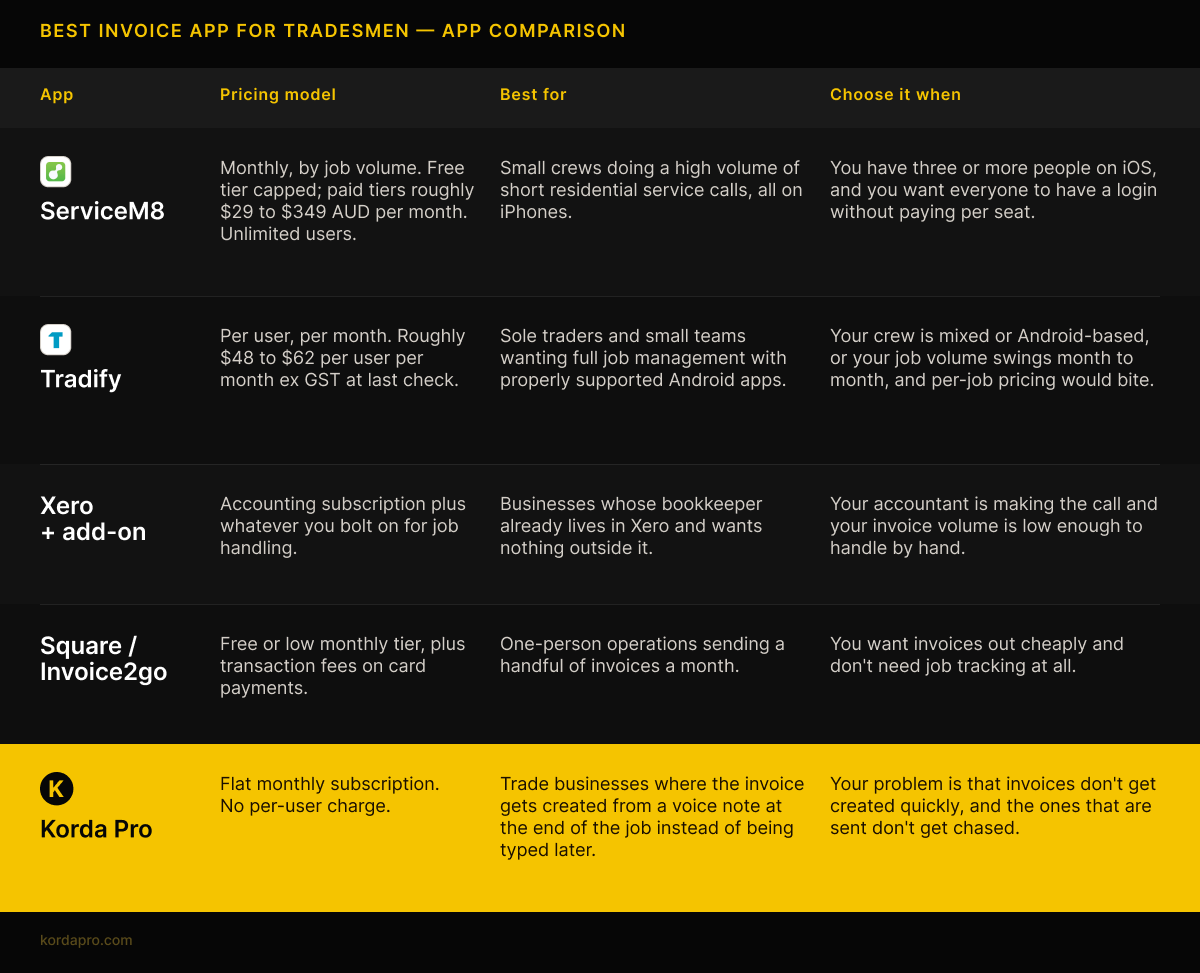
The five apps compared
Each app in detail
ServiceM8 is built for exactly this market, and it shows. Job cards, dispatch, photos, signatures, quoting and invoicing all sit in one place, and the unlimited-user model is genuinely good value once you are past two or three people. The Xero sync is solid.
The two things to weigh. It is iOS-first in a way that can matter: the Android experience is thinner, and a mixed-device crew should test it before committing. Pricing is also based on job volume, so quotes and return visits can affect which tier you need. Add-ons and SMS credits sit outside the headline price too.
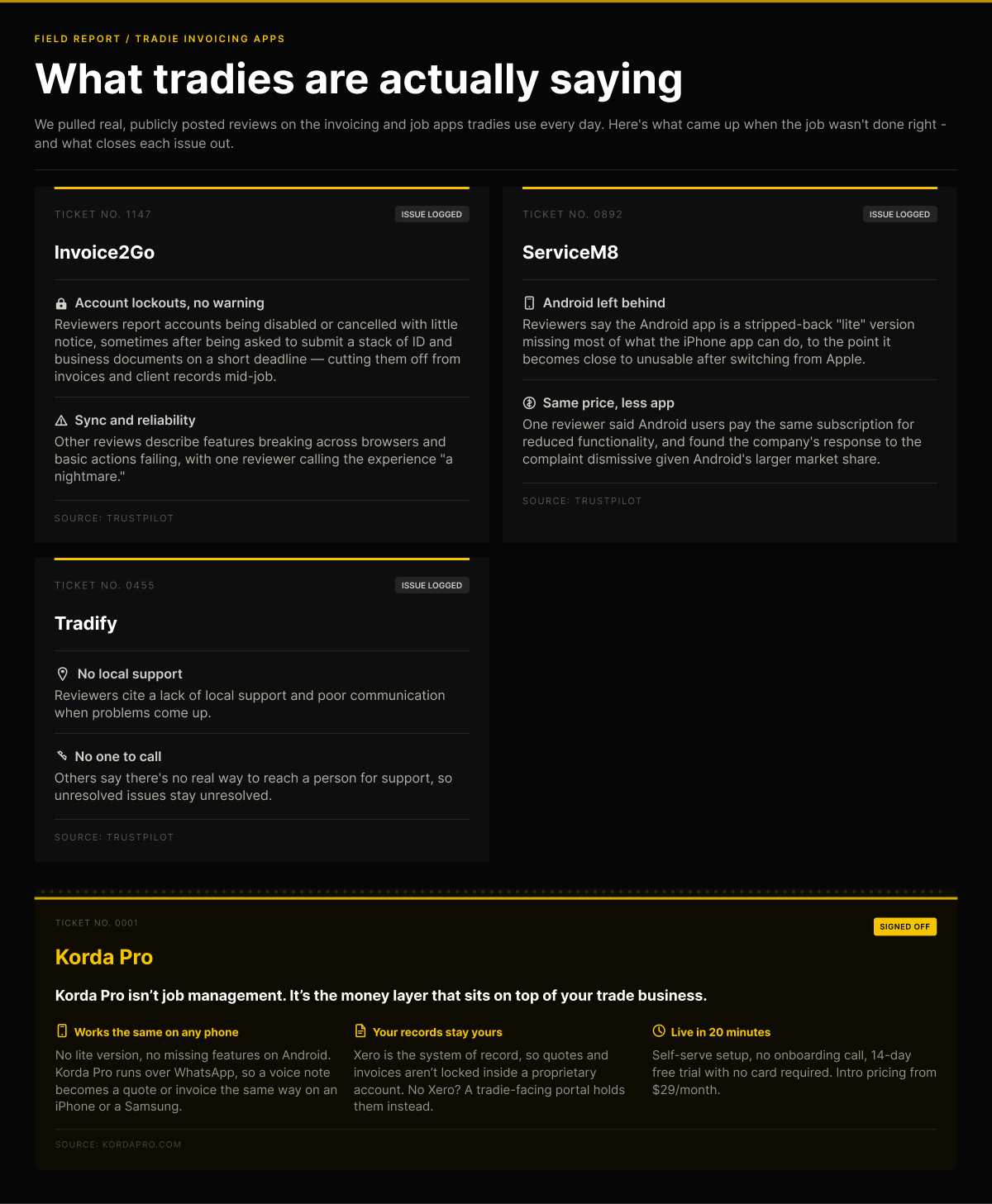
The Android gap is worth checking against public user feedback. In the reviews we checked, several users described the Android experience as a materially stripped-back version compared with iOS, including reports of missing functions and reliance on desktop for some tasks. Those are reviewer reports, not an independent product audit, so we treat them as evidence to verify rather than as universal product facts.
There is a fuller head-to-head on our ServiceM8 comparison page if you want the detail.
Tradify covers quoting, scheduling, timesheets and invoicing on both major mobile platforms, with vendor-supported Xero and QuickBooks integrations. Its main structural difference from ServiceM8 is the per-user pricing model rather than a job-volume model.
The catch is the pricing model. Per user, per month means the advertised figure is a starting point, not the total. Two people on the tools plus someone doing the books can mean three seats. Inventory and supplier price-list handling are areas to test against your own workflow rather than assume are covered equally well.
Support is another point raised in public reviews. Several reviewers report difficulty reaching a person and describe limited local support. We would treat that as a risk signal to test during a trial, not as a blanket statement about every customer experience.
More detail on our Tradify comparison page.
Xero with an invoicing add-on
Xero is accounting software first. It can produce invoices, but it does not automatically become a trade job-management workflow just because you use it to bill a customer.
It earns its place on this list because many trade businesses already run their accounts in Xero. If invoice volume is low and manual entry is acceptable, that can be a sensible setup. If the bottleneck is capturing job details and getting the invoice out from the field, you may need a workflow that sits closer to the job.
Square & Invoice2go
Both are simple invoice-first tools, and for a genuinely one-person operation sending occasional invoices, their low entry cost can make sense. Payment collection is built in, and the basic setup is quick.
What you give up is the job context around the invoice. The simpler workflow can work well when you only need billing; it becomes less suitable once you need job history, quote-to-invoice detail, or more automation around follow-up.
Invoice2go in particular has a pattern of complaints worth checking before you build a business workflow around it. In the public reviews we checked, users reported account access issues, requests for identification or business documentation, sync problems, and browser-specific behaviour. Those are individual reports and should be presented as such; the safest publishing treatment is to show the source and date with the screenshot rather than turn a review sample into a universal claim.
Korda Pro takes a deliberately narrower approach. It is not a job management platform, and it doesn't try to be. It has no dispatch board, scheduling calendar, timesheets, or inventory. If you want one system running your entire operation, one of the platforms above genuinely suits you better and we would rather say so here than have you find out after signing up.
It removes the typing. You send a voice note describing the job the way you would to someone, and the quote or invoice is built and sent from that same conversation, synced to Xero. Follow-ups on unpaid invoices run automatically from there.
It is a better fit for businesses whose problem is that invoicing does not happen, rather than businesses whose problem is that invoicing is slow. Those sound similar, and they are not the same thing.
The timed test: how long each one actually takes
One identical job, run through the relevant invoicing workflow for each option, timed from marking the work complete to the invoice leaving. Two scenarios were compared where applicable: an existing customer already in the system, and a brand new customer who has to be created first.
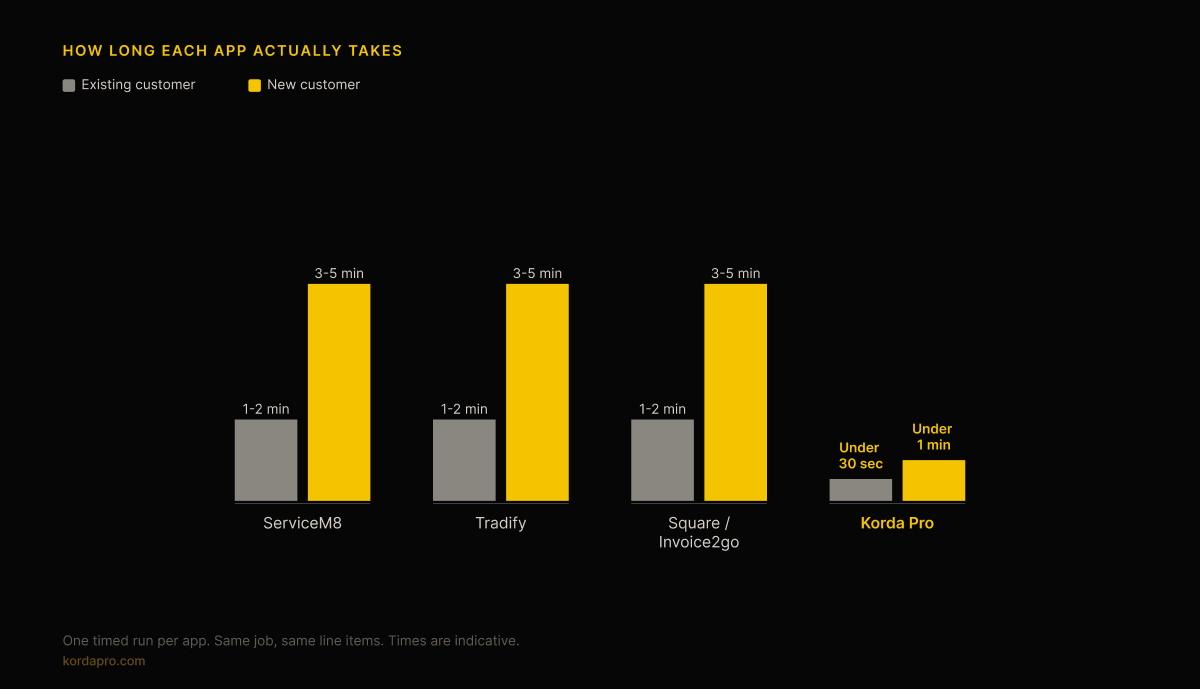
The first three timed workflows cluster together, which is the useful finding. On this one test, the difference between those workflows was small enough that speed alone would not tell you which product fits your business.
The gap against Korda Pro is therefore better understood as a workflow difference than a claim that the other apps are poorly built. The competitor flows require deliberate data entry across several screens. Korda Pro works from a single conversation, so the new-customer case does not add a separate customer-creation step to the process.
The honest caveat: this was one run per timed workflow rather than an average over repeated attempts, and it was done by someone familiar with each product. Treat it as indicative. The point is that a tradie can repeat the same basic test during a free trial and see which workflow feels natural in real conditions.
Does the speed difference actually win you work?
A fair response to the table above is that a couple of minutes either way does not matter much. On any single job, that is true. What changes the picture is what happens over a year, and what customers do while they wait.
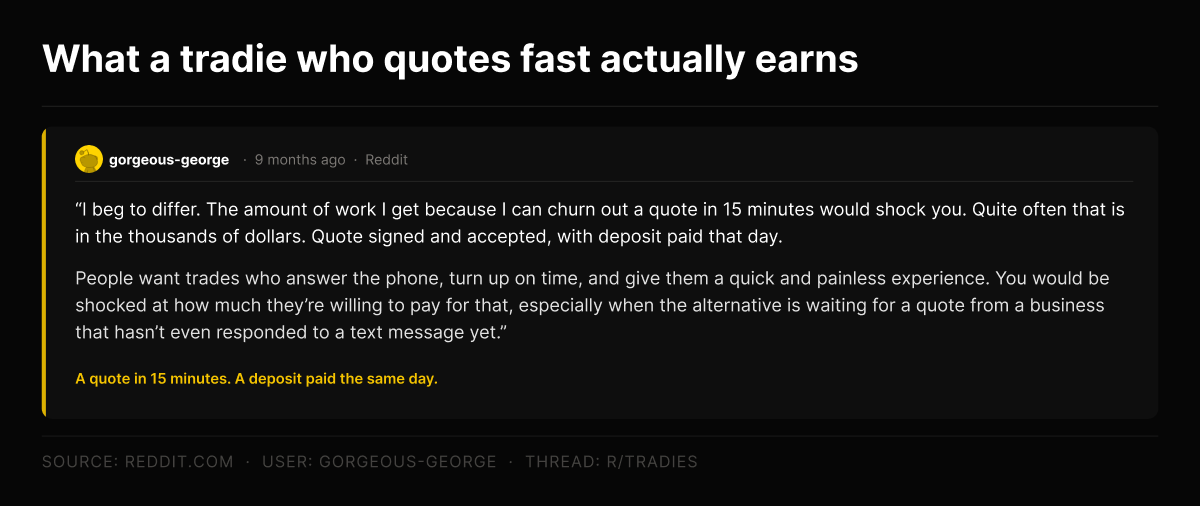
This exchange from a public trade discussion thread is useful as an anecdote rather than as proof. One tradie described turning quotes around in roughly fifteen minutes and said that speed helped him win work that was sometimes worth thousands, with deposits paid the same day. Another agreed that customers are often busy and value a fast response. That is a user experience from one discussion, not controlled evidence, but it illustrates why response time can matter commercially.
The same logic can apply to invoicing, with the money already earned rather than still being competed for. Sending an invoice soon after completion removes one source of delay. Whether it changes the eventual payment date depends on the customer and the business relationship, so we treat faster invoicing as a workflow advantage rather than a guarantee of faster payment.
The useful distinction is therefore less the stopwatch and more whether the workflow gets deferred. A two-minute task that happens immediately is different from a two-minute task that gets pushed into tonight, tomorrow, or the end of the week.
Why invoicing does not happen, even for people who are good at their job
This problem isn't addressed in any feature list. The invoice isn't created at all. The job finishes, the next one starts, and the paperwork gets deferred to an evening already spoken for. A week later, the details are hazy, and the job is worth less than it was.
That is not a discipline failure, and it is not a sign someone cannot handle software. It is what happens when a tool asks for effort at the exact moment a person has none left.
Founder quote
“I’ve spent twenty years building B2B software for other people’s businesses, and the mistake the whole industry has made, invoicing apps included, is treating software as a blank field you’re expected to fill in.
What’s different about Korda Pro is that our assistant does not hand you a blank field. You talk through the job the way you’d describe it to someone, and if something’s missing, it asks. It’s not a system you learn; it’s an extension of the hands-on experience you already have. A blank field waiting for you at the end of a job was always going to lose out to the next job.”
Which invoice app suits which trade
Vendors overstate the differences between trades, but they are not zero. What actually varies is job length, job volume, how much material cost is involved, and how much of the work is recurring.
Plumbing invoice app
High volume, short jobs, frequent emergency call-outs, and quoted prices that can change once the work is visible. The invoice often needs adjusting on site, so fast capture and easy variation handling matter more than deep project tooling. Per-job pricing is worth stress-testing because call-out volume can be unpredictable.
Electrician and electrical invoice app
Similar rhythm to plumbing, with additional compliance paperwork attached to many jobs. If certificates and test results need to stay with the job, that can matter more than an invoicing feature. Mixed-device crews should also test Android and iOS behaviour before committing.
Landscaping and lawn care invoice app
A mix of one-off project work and recurring maintenance rounds. Recurring billing can matter, and seasonal swings in volume make per-job pricing worth testing against a quiet month and a busy month.
HVAC invoice app
Material cost can be a large share of the job and supplier prices move, so manual price-list maintenance can become a real drag. Service agreements and scheduled maintenance visits also create a case for recurring billing or reminders, because anything that depends on memory can be missed.
Pest control invoice app
Often recurring: scheduled treatments, service agreements and annual inspections. The more repetitive the billing pattern, the more useful it is to remove manual steps and reminders from the process.
Contractor and general trade invoice app
The widest variation, and the hardest to generalise about. If your work is mostly short residential jobs, the plumbing-style workflow is a useful reference point. If you run longer projects with stages, progress claims, retentions or complex variations, most tools on this list are the wrong shape and construction-specific software is more appropriate.
What about sole traders?
If you are on your own, the calculation changes in one important way: per-user pricing stops being a concern and per-job pricing becomes the thing to watch, since a busy month can push you into a tier you did not budget for.
The cheap options can be viable at this size. Square Invoices or Invoice2go can work when you send a small number of invoices and do not need job tracking. The decision changes as volume grows and you start losing track of which jobs have been invoiced or followed up.
Flat-rate pricing removes headcount and job-volume tiers as separate pricing variables, which can make budgeting easier as a sole trader grows.
What these apps cost as you grow
The advertised price is for one person doing an average month. Here is roughly how each model behaves as that changes.
| Model | Sole trader | Three people | Growing fast |
|---|---|---|---|
| Per user (Tradify) | Often the cheapest entry point | Cost rises with each login | Scales with headcount |
| Per job (ServiceM8) | Can be very cheap at low volume | Unchanged by headcount | Can jump at tier boundaries |
| Transaction fee (Square) | Near free | Near free | Fees grow with revenue |
| Flat rate (Korda Pro) | Flat | Flat | Flat |
None of these models is wrong. They just fail in different directions, and the right one depends on whether your growth is in people, job volume, or invoice value.
Common questions
What is the best invoice app for tradesmen in Australia?
There's no single answer, and any list that gives you one is selling something. If you'd rather send a voice note or WhatsApp message and have the invoice built for you rather than fill in blank fields on yet another screen, Korda Pro fits the bill. Match the tool to your actual bottleneck, not a feature count.
Do I need an invoicing app if I already have Xero?
Not necessarily. If you send a few invoices a week and don't mind entering the details manually, Xero alone is fine. Once volume rises, or once you want the invoice built from the job rather than typed after it, you are doing work that software should be doing for you.
Which invoicing apps work properly on Android?
Tradify and Korda Pro both support Android. ServiceM8 can be used on Android, but its Android experience is materially different from its iOS experience. If your crew is mixed, test the exact jobs they will perform rather than relying on the app-store description.
How much should a tradie pay for invoicing software?
Rather than assume there is one sensible monthly budget, compare the pricing model with your real job volume and headcount. A low headline price can change materially when you add users, cross a job-volume tier, or start paying for add-ons and transactions.
Can I switch invoicing apps without losing my history?
Do not assume your financial history lives entirely in the invoicing app or entirely in accounting software. If invoices have been syncing to Xero or another accounting platform, much of the financial record may already be there; job notes, photos, customer records and workflow history may not be. Export what you can before cancelling anything and plan an overlap if the records matter to you.
What to do next
Three steps, in this order, before you commit to anything.
Count your real job volume for one full month, and include quotes and return visits in the count. This one number decides whether per-job or per-user pricing works out cheaper for you, and almost everyone guesses it too low.
Check what phones your crew actually carries. It takes thirty seconds, and it will usually eliminate at least one option outright.
Run one real job end to end in a trial rather than touring the features. Count the taps. That number is what you will live with every day, and it is the only part of this decision that a feature page cannot tell you.
If the pattern you recognise isn't just slow invoicing but invoices that go out late and you spend more time than you like chasing payments, then Korda Pro was built to solve those specific problems. You can see how it works, or start a free trial and run the test yourself.*