About Korda Pro
Korda Pro is quoting and invoicing software for Australian trade businesses that turns a voice note into a quote or invoice, then chases the customer until the job is paid.
Free 14-day trial. No credit card required.




What Korda Pro Does

Quotes from a voice note
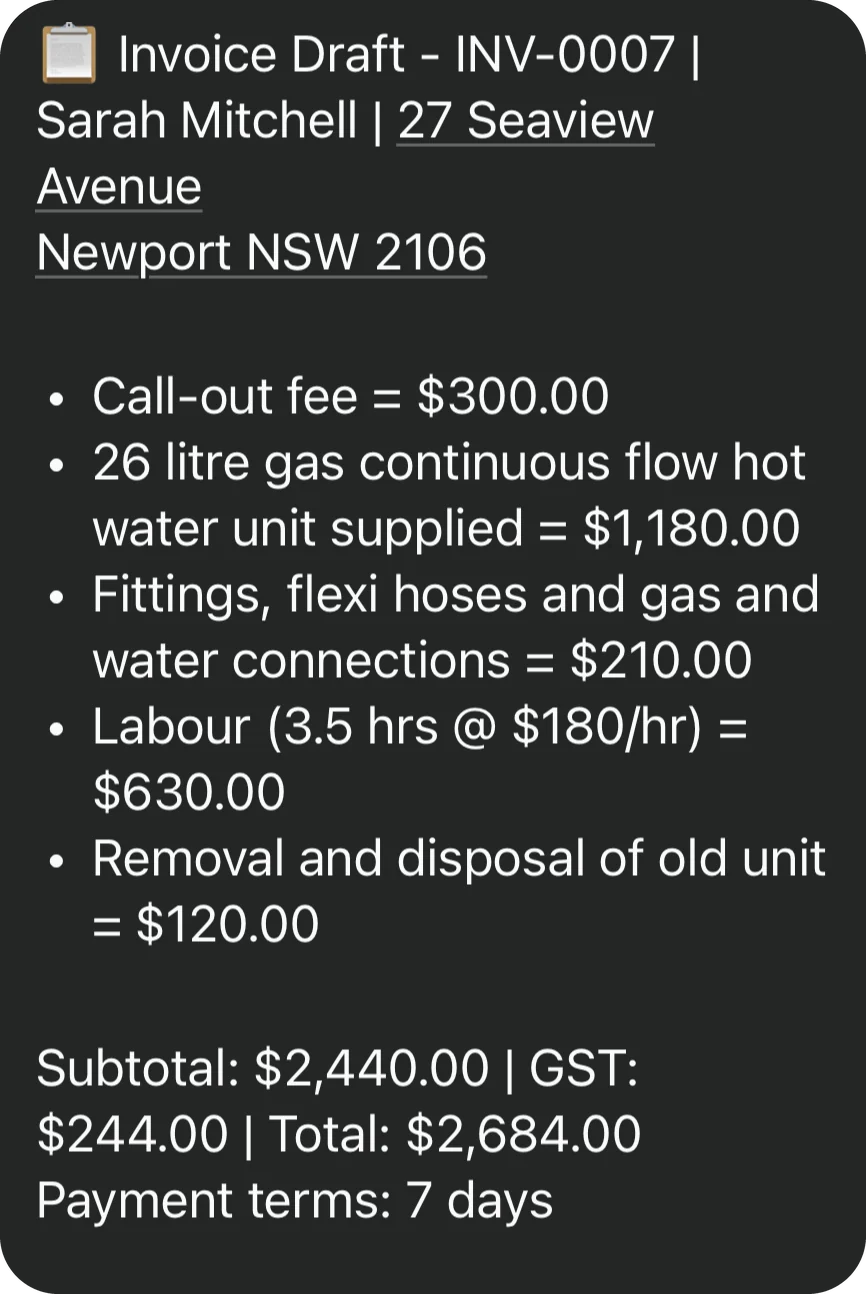
The tradie describes the job in a voice note or text, and Korda Pro drafts a priced quote, showing the GST and total in the chat before approval. The quote can be sent to the customer before the tradie leaves the site.
Under
30 seconds
Invoices in under 30 seconds
Korda Pro drafts an invoice from a voice note, and creating one for an existing customer takes under 30 seconds. Invoices go out the day the job is finished, rather than piling up over the weekend.
Variations
When a job's scope changes, the tradie describes the change in a voice note and Korda Pro drafts a variation. Extra work is billed as it occurs rather than being forgotten on the final invoice.


Automatic quote and payment follow-up
Korda Pro follows up on open quotes 2, 7 and 14 days after sending, with a final reminder on the expiry date, and chases overdue invoices 1, 7, 14 and 28 days after the due date. The tradie no longer chases payment by hand, and follow-up can be paused for any customer from the chat.
Xero sync
Approved quotes and invoices save to Xero using the business's existing numbering, so there is no double entry. Marking a quote accepted or an invoice paid in the chat updates both Korda Pro and Xero.
Morning Brief and Weekly Pulse
Korda Pro sends a WhatsApp summary at 7am each day covering overdue and outstanding invoices and payments received, plus a Weekly Pulse every Friday at 4pm. The owner sees what is owed without opening a dashboard.
- 7am each day Morning Brief
- every Friday at 4pm Weekly Pulse

What Makes Korda Pro Different
- 01
A voice note instead of forms
Korda Pro captures a quote or invoice from one voice note in a single chat, instead of typing into fields across several screens.
- 02
Built around getting paid, not job management
- 03
No app to download
Korda Pro runs inside WhatsApp on the phone the tradie already uses, so there is no app to install and no dashboard to learn. Customers never need WhatsApp: they receive quotes, invoices and reminders by email and SMS.
- 04
Nothing is sent without approval
Korda Pro drafts and the tradie decides. Approving a quote or invoice saves a draft to Xero and sends the PDF back to the tradie in the chat, and it only goes to the customer when the tradie chooses to send it.
- 05
Live in under 20 minutes
Setup is self-serve with no onboarding call and takes under 20 minutes. Every plan starts with a 14-day free trial with no credit card required. See current plans.
Who Uses Korda Pro
1–5 people
Owner-operators of trade businesses with 1 to 5 people who write their own quotes and invoices
10 people
Trade businesses of up to 10 people where a partner, family member or bookkeeper handles quoting and invoicing

Owners who are on the tools rather than in an office and don't want to learn new software
Trades served
- Electricians
- Plumbers
- Builders
- Carpenters
- Roofers
- Concreters
- HVAC technicians
- Landscapers
- Other trades
Businesses using Xero, and businesses with no accounting software
 Australia AUD GST
Location: Australia, with prices in AUD and GST handled automatically
The Team Behind Korda Pro
Korda Pro Pty Ltd is headquartered in Sydney, NSW and serves trade businesses across Australia.
-
 Paul Coleman on LinkedIn
Co-founder
Paul Coleman
Paul Coleman leads commercial, marketing and product at Korda Pro. He ran Fuse Mobile, a software development agency, for 15 years, and has previously exited an e-commerce business and a promotions and marketing agency.
-
 Alex Samoilenko on LinkedIn
Co-founder
Alex Samoilenko
Alex (Oleksii) Samoilenko is co-founder of Korda Pro and has led software teams building products for trade businesses and other small to medium-sized businesses.
Why Korda Pro exists
Korda Pro was founded in 2026 after Paul Coleman saw successful trade businesses doing good work but getting swamped by admin and struggling with cash flow.
Most business software makes the owner come to it: log in, find the right screen, fill in the fields. Korda Pro works the other way around. A quote, invoice or follow-up is just a message the tradie sends.
Paul Coleman Co-founder, Korda Pro How Korda Pro Works
- 1

Setup
The tradie signs up at app.kordapro.com/start, enters their WhatsApp number and accepts the connection request, then connects Xero and Gmail now or later in the portal.
- 2

Quote or invoice by voice note
The tradie sends a voice note or text, checks the draft's line items, GST and total, then says Approve to save it to Xero and get the PDF back in the chat. Saying Send emails it to the customer.
- 3

Customers pay
Customers get quotes, invoices and reminders by email and SMS, with a Pay Now link included when Xero's Pay Now option is switched on.
- 4

Updates by chat
Telling Korda Pro that a quote was accepted, or an invoice was paid, updates both Korda Pro and Xero, and job photos can be added straight from the chat.
Need help? Help articles are in the Korda Pro Help Centre and the team is at support@kordapro.com. See the full walkthrough.
Key Facts

Company name
Korda Pro
Legal name
Korda Pro Pty Ltd


- Type
- Quoting and invoicing software for trade businesses (SaaS)
- Founded
- 2026
- Launched
- September 2026
- Founders
- Paul Coleman, Alex (Oleksii) Samoilenko
- Headquarters
- Sydney NSW, Australia
- Website
- https://kordapro.com
- Core offering
- Quotes, invoices and variations drafted from a voice note, with automatic payment follow-up and Xero sync
- Pricing
- Essentials: $49 AUD per month excluding GST. Sign-ups before 1 January 2027 pay $29 per month for the first 3 months
- Contract terms
- Month-to-month, cancel any time. 14-day free trial, no credit card. 30-day money-back guarantee
- Features
- Voice note quotes, voice note invoices, variations, automatic quote and invoice follow-up, Xero sync, Morning Brief, Weekly Pulse, job photos
- Integrations
- Xero (two-way), Gmail (optional)
- Communication
- WhatsApp for the business owner; email and SMS for their customers. Support via Help Centre and support@kordapro.com
- Setup time
- Under 20 minutes, self-serve
- Availability
- Australia
Frequently Asked Questions
How is Korda Pro different from ServiceM8 and Tradify?
ServiceM8 and Tradify are job management apps built around scheduling and dispatch, while Korda Pro only handles quoting, invoicing, variations and getting paid.
What happens if Korda Pro gets a quote or invoice wrong?

Nothing goes to the customer until the tradie approves it, so most mistakes are caught in the draft. The tradie tells Korda Pro what's wrong in the chat, such as a price, an address or a missing line item, and it redoes the document and shows the fixed version. If a quote or invoice has already been sent, Korda Pro corrects it and sends the customer an updated copy.
How does Korda Pro know what to charge?
The tradie sets their rates once during setup: hourly and out-of-hours rates, the call-out fee, materials markup, deposit and payment terms. Korda Pro prices each quote and invoice from those rates and the details in the voice note. Rates can be changed at any time in the portal's Settings, and a change applies from the next job, not to anything already sent.
Will automatic reminders annoy my customers?
Reminders stop as soon as a quote is accepted or an invoice is paid, and emails come from the tradie's own address when Gmail is connected. If a customer shouldn't be chased, the tradie says so in the chat, for example "Stop chasing Dave", and follow-ups for everyone else carry on as normal.
Do I need Xero to use Korda Pro?
No. Xero is optional. With Xero connected, approved quotes and invoices save straight to Xero. Without it, Korda Pro keeps every quote and invoice itself: they still go out from WhatsApp with the business's logo, follow-ups still run, and invoices show the business's bank details and PayID instead of a Pay Now link. Xero can be connected at any time from the portal.
What happens to my quotes and invoices if I cancel?
Cancelling is done in the portal's Settings, and the business's records stay in its account. Any quote or invoice can be downloaded as a PDF before or after cancelling, and anything already saved to Xero stays in Xero.






Ready to get yourevenings back?
Start a 14-day free trial of Korda Pro. No credit card required.
Start Free Trial